
Best Dash Cam for Tesla (and Best USB Drive for TeslaCam)


As an Amazon Associate I earn from qualifying purchases. We may earn a commission when you buy through links on this page. Learn more.
In this guide (7 sections)
Top picks at a glance
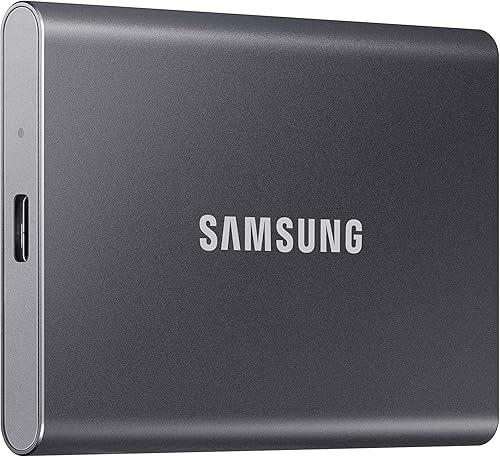
 Best TeslaCam storageSamsung T7 Portable SSDView on Amazon
 Rugged alternativeSanDisk Extreme Portable SSDView on Amazon
 Best aftermarketVIOFO A229 ProView on Amazon
 Best cloud-connectedBlackVue DR970X LTE Plus IIView on Amazon
 Best parking coverageThinkware U3000 ProView on Amazon
Every modern Tesla can record video from its own cameras through the built-in Dashcam and Sentry Mode. For many owners, the best "dash cam" upgrade is simply better storage. Others still add an aftermarket camera for higher resolution, rear-window coverage or cloud alerts.
Quick answer: our top pick is the Samsung T7 Portable SSD, for most owners, because Tesla's built-in Dashcam and Sentry Mode already record — reliable storage is the upgrade that matters; add a VIOFO A229 Pro only if you want sharper footage.
Option 1: Use Tesla's built-in Dashcam
Tesla records from multiple vehicle cameras to a USB drive or, on some models, a glovebox USB port. Sentry Mode records events while parked.
What storage to use
- Use a reliable USB SSD or high-endurance flash drive, formatted as your car requires.
- Larger drives store more Sentry clips before old footage is overwritten.
- Avoid cheap no-name drives; constant writing kills them.
Samsung T7 Portable SSD
Best for: Owners who want fast, durable storage for Dashcam and Sentry Mode.
- Digital Storage Capacity
- 1 TB
- Hard Disk Interface
- USB 3.0
- Connectivity Technology
- USB
- Hard Disk Description
- Solid State Hard Drive
- Installation Type
- External Hard Drive
- Read Speed
- 1050 MB/s
The T7 is a pocket-sized PCIe NVMe SSD with read speeds up to 1,050MB/s over USB 3.2 Gen 2. Formatted for TeslaCam, it gives Dashcam and Sentry Mode fast, durable storage, in sizes up to 4TB.
Pros
- Much more durable than a flash drive for constant recording
- Up to 1,050MB/s read speed
- Compact enough to tuck in the glovebox
- 1TB to 4TB capacities
Cons
- Needs a short USB cable in the glovebox or console
- More than you need if you only keep a few clips
SanDisk Extreme Portable SSD
Best for: Owners who want a rugged, rubberized SSD.
- Digital Storage Capacity
- 1 TB
- Hard Disk Interface
- USB 3.0
- Connectivity Technology
- USB
- Hard Disk Form Factor
- 0.4 inches
- Hard Disk Description
- Solid State Drive
- Installation Type
- External Hard Drive
SanDisk's newest Extreme Portable SSD reads at up to 2,000MB/s and has an IP65 rating with drop protection up to 3 meters. Its rubberized shell suits a hot or cold car better than a bare drive.
Pros
- IP65 water and dust resistance
- Drop protection up to 3 m
- Up to 2,000MB/s read speed
- Pocket-sized with a carry loop
Cons
- Slightly bulkier than the T7
- Its top speed needs a host that supports it
- Tesla will not use it all
Quick comparison
| Product | Type | Best for | Price |
|---|---|---|---|
| Samsung T7 Portable SSD | TeslaCam storage | Reliable recording for the built-in Dashcam and Sentry Mode | Check price |
| SanDisk Extreme Portable SSD | TeslaCam storage | A rugged drive for heat and frequent use | Check price |
| VIOFO A229 Pro | Aftermarket dash cam | Sharper front and rear footage | Check price |
| BlackVue DR970X LTE Plus II | Cloud dash cam | Remote alerts and live view | Check price |
| Thinkware U3000 Pro | Aftermarket dash cam | Long parking coverage | Check price |
Option 2: Add an aftermarket dash cam
Consider an aftermarket camera when you want:
- Higher-resolution front video for reading license plates.
- Cloud alerts and remote live view.
- A recording that does not depend on the car's software.

VIOFO A229 Pro
Best for: Tesla owners who want sharper front footage.
- Vehicle Service Type
- Car, Minivan, RV, Truck, vehicle
- Connectivity Technology
- Type-C
- Video Capture Resolution
- 1440p, 2160p
- Mounting Type
- Windshield Mount
- Field Of View
- 140 degrees
- Other Special Features of the Product
- Built-In GPS, Built-In WiFi, Night Vision, Voice Control
If you want sharper footage than Tesla's built-in cameras, the A229 Pro records 4K front and 2K rear on STARVIS 2 sensors with HDR. Buffered parking mode works alongside Sentry Mode when hardwired.
Pros
- 4K front camera with STARVIS 2 and HDR
- Buffered parking mode
- Built-in GPS and Wi-Fi
- Voice commands
Cons
- Needs a power source and cable routing in the cabin
- Duplicates some of Tesla's own camera coverage
BlackVue DR970X LTE Plus II
Best for: Owners who want remote alerts and live view.
- Vehicle Service Type
- Car, Sedan, Suv, Truck, Van
- Connectivity Technology
- LTE
- Video Capture Resolution
- 1920 X 1080 (full Hd), 3840 X 2160 (4k Uhd)
- Mounting Type
- Windshield Mount
- Field Of View
- 146 degrees
- Control Method
- App, Push Button, Touch
The DR970X LTE Plus II adds what Tesla's cameras do not: built-in LTE for live view, remote playback and impact alerts from anywhere in the US or Canada. Video is 4K front and Full HD rear.
Pros
- Live view and alerts over built-in LTE
- 4K front with STARVIS 2 HDR
- Discreet design
- Buffered parking mode
Cons
- Needs an LTE data plan
- Premium price

Thinkware U3000 Pro
Best for: Owners who park on the street for long periods.
- Vehicle Service Type
- Bus, Car, Minivan, RV, Truck
- Connectivity Technology
- Wi-Fi
- Video Capture Resolution
- 1440p, 2160p
- Mounting Type
- Windshield Mount
- Field Of View
- 147.2 degrees
- Control Method
- App
The U3000 Pro's radar parking mode wakes the camera only when something approaches, which suits a Tesla parked on the street for long stretches. It records 4K front and 2K rear on STARVIS 2 sensors.
Pros
- Radar parking mode for long standby
- 4K front and 2K rear video
- Dual-band Wi-Fi and GPS
Cons
- Expensive
- Needs a hardwire or battery pack for parking mode
Powering an aftermarket dash cam in a Tesla
Some Tesla USB ports turn off when the car sleeps. For parking recording, many owners use a dedicated dash cam battery pack or a Tesla-specific power cable kit. Follow the dash cam maker's Tesla instructions.
Sentry Mode and an aftermarket parking mode both consume power. Watch your idle battery drain, especially in cold weather.
Tesla dash cam FAQ
Does Tesla have a built-in dash cam?
Yes. Tesla's Dashcam and Sentry Mode record from the car's cameras to a USB drive plugged into the car. Check your owner's manual for the supported drive format and the right USB port.
What USB drive works best for TeslaCam?
A portable SSD such as the Samsung T7 or SanDisk Extreme Portable SSD handles constant writing better than a cheap thumb drive. Format it as the car requires before first use.
Why add an aftermarket dash cam to a Tesla?
For higher resolution, a camera that covers the rear window, or cloud alerts while you are away. A hardwired camera needs power planning so it does not keep the car awake longer than you want.
Bottom line
Start with a quality SSD like the Samsung T7 for the built-in Dashcam. If you want sharper footage or cloud alerts, add a VIOFO A229 Pro or BlackVue DR970X LTE Plus II.
Sources
Official sources for the standards, safety rules and products in this guide. Specifications change between model years, so confirm current specs and fitment on the manufacturer's site before you buy.
- Tesla — official site — current product specifications
- Samsung portable SSDs — official site — current product specifications
- SanDisk — official site — current product specifications
- VIOFO — official site — current product specifications


