Best Dash Cam for Parking Mode (and How to Power It Safely)


As an Amazon Associate I earn from qualifying purchases. We may earn a commission when you buy through links on this page. Learn more.
In this guide (8 sections)
Top picks at a glance
 Best overallVIOFO A229 ProView on Amazon
 Best 3-channelVantrue N4 Pro SView on Amazon
 Best for long parkingThinkware U3000 ProView on Amazon
 Best cloud-connectedBlackVue DR970X LTE Plus IIView on Amazon
 Most discreetGarmin Dash Cam Mini 3View on Amazon
Most dash cams claim "parking mode," but the feature means very different things from one model to another. Some record only when they feel an impact. Others keep a buffer so you see the seconds before someone hits your car. A few use radar to wake up only when something moves nearby.
Quick answer: our top pick is the VIOFO A229 Pro, for most drivers: sharp day and night video plus buffered parking mode when hardwired; the Thinkware U3000 Pro adds radar for long street parking.
This guide explains the differences, then recommends the best cams for each situation.
Parking mode types explained
| Type | How it works | Pros | Cons |
|---|---|---|---|
| Impact-triggered | Sleeps until the G-sensor detects a bump | Lowest power use | Misses the moments before impact |
| Buffered | Records continuously to memory, saves a clip when triggered | Captures before and after the event | Uses more power |
| Time-lapse | Records at low frame rate all the time | Nothing is missed | Choppy footage, heavy power use |
| Radar-based | A radar sensor wakes the camera when something approaches | Long standby time | Only on select models |
Powering parking mode
A dash cam cannot record parked if it loses power when you turn the car off. You have three options:
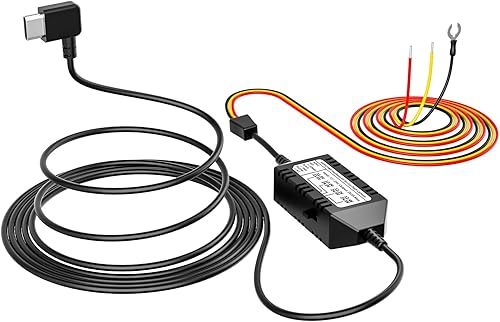
- Hardwire kit: connects to your fuse box and includes a low-voltage cutoff that shuts the camera off before your battery drains.
- OBD-II power cable: plugs into the OBD port. Easier than hardwiring, but check that your car's port stays powered when off.
- Dash cam battery pack: a separate battery that charges while you drive and powers the cam while parked, so your car battery is never touched.
Set the low-voltage cutoff to at least 12.0V (higher in cold climates). If your car sits for days, a dedicated battery pack is the safer choice.
The best dash cams for parking mode
VIOFO A229 Pro
Best for: Most drivers who want sharp front and rear video with buffered parking mode.
- Vehicle Service Type
- Car, Minivan, RV, Truck, vehicle
- Connectivity Technology
- Type-C
- Video Capture Resolution
- 1440p, 2160p
- Mounting Type
- Windshield Mount
- Field Of View
- 140 degrees
- Other Special Features of the Product
- Built-In GPS, Built-In WiFi, Night Vision, Voice Control
The A229 Pro records 4K up front and 2K at the rear on two Sony STARVIS 2 sensors (IMX678 and IMX675) with HDR for night driving. It has three parking modes, including buffered recording that saves the seconds before a bump, plus built-in GPS, Wi-Fi and 12 voice commands.
Pros
- 4K front + 2K rear on STARVIS 2 sensors with HDR
- Buffered, time-lapse and low-bitrate parking modes
- Built-in GPS and Wi-Fi
- Hands-free voice commands to lock clips or take photos
Cons
- Parking mode needs VIOFO's hardwire kit, sold separately in some bundles
- 140° front field of view is narrower than some rivals

Vantrue N4 Pro S
Best for: Rideshare drivers who need front, cabin and rear coverage.
- Vehicle Service Type
- Bus, Car, Minivan, RV, Truck
- Connectivity Technology
- USB, Wi-Fi
- Video Capture Resolution
- 2160p, 4K+1080P+2.5K, 4K+2.5K, 4K(3840*2160P)
- Mounting Type
- Windshield Mount
- Field Of View
- 165 degrees
- Control Method
- App, Voice
The N4 Pro S records three channels at once: 4K front, 1080p cabin and a 2.5K rear camera that rotates 360° to face traffic or the cargo area. All three use STARVIS 2 sensors, and buffered motion and impact detection covers the car while parked.
Pros
- Front, cabin and rear coverage in one kit
- Rear camera rotates 360° for traffic or trunk monitoring
- Triple STARVIS 2 sensors with HDR
- 165° field of view and a 3.19-inch screen
Cons
- Three cameras mean more cables to route
- The cabin camera is unnecessary for many private drivers
Thinkware U3000 Pro
Best for: Cars parked for long stretches on the street or in public lots.
- Vehicle Service Type
- Bus, Car, Minivan, RV, Truck
- Connectivity Technology
- Wi-Fi
- Video Capture Resolution
- 1440p, 2160p
- Mounting Type
- Windshield Mount
- Field Of View
- 147.2 degrees
- Control Method
- App
The U3000 Pro pairs a 4K front and 2K rear camera on STARVIS 2 sensors with Thinkware's radar parking mode. The radar wakes the camera only when something moves nearby, then saves a 20-second clip, which uses far less battery than constant recording.
Pros
- Radar parking mode stretches battery life
- 4K front and 2K rear STARVIS 2 video
- Event files include 10 seconds before and after
- Dual-band Wi-Fi and GPS tagging
Cons
- Premium price
- Cloud features need extra hardware and a data plan

BlackVue DR970X LTE Plus II
Best for: Owners who want live alerts and remote viewing on their phone.
- Vehicle Service Type
- Car, Sedan, Suv, Truck, Van
- Connectivity Technology
- LTE
- Video Capture Resolution
- 1920 X 1080 (full Hd), 3840 X 2160 (4k Uhd)
- Mounting Type
- Windshield Mount
- Field Of View
- 146 degrees
- Control Method
- App, Push Button, Touch
This DR970X has LTE built in, so live view, remote playback, auto backup and GPS tracking work without a separate module. It records 4K front with a STARVIS 2 HDR sensor and Full HD rear, using H.265 to save card space. LTE works in the US and Canada only.
Pros
- Built-in LTE for live view and impact alerts anywhere
- 4K front with STARVIS 2 and HDR
- H.265 compression saves storage
- Discreet, screenless design
Cons
- Cloud features need an LTE data plan
- LTE works only in the US and Canada
Garmin Dash Cam Mini 3
Best for: Drivers who want a tiny camera that hides behind the mirror.
- Vehicle Service Type
- Car
- Connectivity Technology
- Bluetooth, USB, Wi-Fi
- Video Capture Resolution
- 1080p
- Mounting Type
- Windshield Mount
- Field Of View
- 140 degrees
- Other Special Features of the Product
- Bluetooth
The Mini 3 is a key-sized 1080p camera with a 140° lens and a built-in Clarity polarizer to cut windshield glare. Saved clips go to Garmin's online Vault, and it hides behind the mirror so it is easy to forget it is there.
Pros
- Extremely small and discreet
- Built-in polarizer reduces windshield glare
- Online Vault stores saved clips
- Simple voice control
Cons
- Front camera only, at 1080p
- No screen, so you set it up through the app
Choosing the right setup
- Street parking in a busy city: buffered or radar parking mode plus a battery pack.
- Rideshare: a three-channel cam with an infrared cabin camera.
- Hot climates: choose a supercapacitor model instead of an internal lithium battery.
- Car sits for a week at a time: use a battery pack, or accept that parking mode will shut off early.
Memory cards matter
Parking mode writes constantly. Use a high-endurance microSD card rated for dash cams, format it every month or two, and replace it if you see corrupted files.
Parking mode FAQ
Will parking mode drain my car battery?
It can if the camera runs without protection. A hardwire kit with a low-voltage cutoff turns the camera off before the battery gets too low to start the car. See our hardwire kit guide.
What is buffered parking mode?
Buffered parking mode keeps a short loop of video in memory, so when an impact or motion triggers a recording, the clip also includes the seconds before the event.
Do I need a hardwire kit for parking mode?
For most cameras, yes. The 12V socket in many cars turns off with the ignition. A hardwire kit connects to the fuse box and supplies constant power with voltage protection.
Which memory card should I use for parking mode?
Use a high-endurance microSD card made for continuous recording, in the size the camera supports. Format it in the camera every few weeks.
Bottom line
The VIOFO A229 Pro gives most drivers the best mix of video quality and parking features. Rideshare drivers should look at the Vantrue N4 Pro S, and if your car is parked on the street for days, the radar mode on the Thinkware U3000 Pro is worth the premium.
Sources
Official sources for the standards, safety rules and products in this guide. Specifications change between model years, so confirm current specs and fitment on the manufacturer's site before you buy.
- VIOFO — official site — current product specifications
- Vantrue — official site — current product specifications
- Thinkware — official site — current product specifications
- BlackVue — official site — current product specifications