
Best Bidirectional Scan Tool for Beginners


As an Amazon Associate I earn from qualifying purchases. We may earn a commission when you buy through links on this page. Learn more.
In this guide (8 sections)
Top picks at a glance
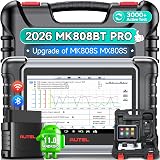 Best overallAutel MaxiCOM MK808BT ProView on Amazon
 Best valueLAUNCH CRP919X BTView on Amazon
 Best for growing skillsTOPDON Phoenix Lite 2View on Amazon
 Phone-based optionOBDLink MX+View on Amazon
A regular scanner listens to your car. A bidirectional scan tool can talk back: it can switch on a cooling fan, cycle the ABS pump to bleed brakes, run an EVAP leak test or command a throttle relearn. That makes it the tool that separates parts-swapping from real diagnosis.
Quick answer: our top pick is the Autel MaxiCOM MK808BT Pro, because it pairs guided menus with real active tests; the LAUNCH CRP919X BT is the value choice.
When a beginner needs bidirectional control
- Brake jobs on ABS cars: some systems need an ABS bleed procedure after air gets into the module.
- Testing a part before buying it: command a fan, fuel pump or solenoid on and see if it responds.
- Relearns after repairs: throttle body, idle, crank position or transmission adaptive resets.
If you only read codes and reset the check-engine light, a standard OBD2 scanner is enough.
Quick picks
| Tool | Best for | Notes | Price |
|---|---|---|---|
| Autel MaxiCOM MK808BT Pro | Best overall | Bidirectional plus wide service menu | Check price |
| LAUNCH CRP919X BT | Value bidirectional tablet | Wireless VCI | Check price |
| TOPDON Phoenix Lite 2 | Larger screen, pro features | Steeper learning curve | Check price |
| OBDLink MX+ (with enhanced add-ons) | Phone-based option | Coverage depends on make | Check price |
The best bidirectional scan tools
Autel MaxiCOM MK808BT Pro
Best for: Beginners who want a guided, well-supported tablet that grows with their skills.
- Power Source
- Battery Powered
- Product Dimensions
- 10"L x 1.4"W x 6.9"H
- Operating System
- Android 11.0
- Screen Size
- 7 inches
- Item Weight
- 885 g
- Automotive Fit Type
- Vehicle Specific Fit
The MK808BT Pro is a 7-inch Android tablet with a Bluetooth VCI, so you are not tied to the OBD port by a cable. It adds bidirectional active tests to Autel's all-system scan and 28+ service functions. Autel lists coverage for 150+ makes, but functions are vehicle-specific, so check your VIN before buying.
Pros
- Bidirectional active tests alongside all-system scans
- 28+ service functions such as oil, EPB and SAS resets
- Bluetooth VCI lets you test from the driver's seat or under the hood
- Guided menus suit first-time users
Cons
- Supported functions vary by make, model and year
- Software updates beyond the included period cost extra
LAUNCH CRP919X BT
Best for: Budget-minded DIYers who want active tests without pro pricing.
- Product Dimensions
- 8.58"L x 1.56"W x 6.06"H
- Operating System
- Android 10.0
- Screen Size
- 7 inches
- Item Weight
- 2 pounds
- Automotive Fit Type
- Universal Fit
- Native Resolution
- 1024x600
The CRP919XBT is a wireless 7-inch LAUNCH tablet with ECU coding, 35+ reset services and all-system scans. It supports FCA AutoAuth secure gateway access and the newer CAN FD and DoIP protocols used on recent vehicles.
Pros
- ECU coding and 35+ resets at a mid-range price
- Wireless VCI connection
- CAN FD and DoIP support for newer vehicles
- FCA AutoAuth for late-model Chrysler, Jeep, Dodge and Ram
Cons
- Busier menus than Autel's tablets
- Read the listing for the update terms that come with your unit
TOPDON Phoenix Lite 2
Best for: Ambitious DIYers who plan to take on bigger jobs.
- Power Source
- Battery Powered
- Product Dimensions
- 10.16"L x 1.99"W x 7.2"H
- Operating System
- android 10
- Screen Size
- 8 inches
- Item Weight
- 2.6 pounds
- Native Resolution
- 1280x800
The Phoenix Lite 2 has the biggest screen here: an 8-inch, 1280x800 tablet. It offers bidirectional control, 34+ reset services, OE-level diagnosis and online ECU coding for brands such as VW, Porsche, Mercedes-Benz and BMW. FCA gateway access is included.
Pros
- 8-inch 1280x800 screen is the easiest to read
- Bidirectional tests plus 34+ resets
- Online ECU coding for several European brands
- FCA AutoAuth gateway access
Cons
- More capability than a true beginner needs on day one
- At 2.6 lb, the heaviest tablet in this guide

OBDLink MX+
Best for: Ford and GM owners who prefer using a phone.
- Power Source
- Vehicle
- Product Dimensions
- 2.01"L x 0.91"W x 1.81"H
- Operating System
- iOS, Android, Windows
- Item Weight
- 28 g
The MX+ is a 28-gram Bluetooth adapter that turns an iPhone, Android phone or Windows PC into a scan tool. OBDLink lists enhanced OEM support for Ford, GM, Mazda, Nissan/Infiniti, Toyota/Lexus, Honda, Hyundai and Kia, and it works with apps like FORScan, BimmerCode and Torque.
Pros
- Tiny adapter that lives in the glovebox
- Works with OBDLink's app and popular third-party apps
- Enhanced data for ABS, SRS and TPMS on supported makes
- The cheapest way into bidirectional tests on Ford via FORScan
Cons
- Bidirectional coverage depends on the app and the make
- You need your own phone or laptop
Safety rules for active tests
Active tests move real parts. Before commanding a fan, keep hands clear of the fan. Before fuel or injector tests, make sure there are no leaks and no ignition sources nearby. Never run ABS tests with the car on unstable jack stands.
- Connect a battery maintainer for long sessions; low voltage can interrupt programming.
- Read each test description before you run it.
- Write down original values before running any adaptation or reset.
Buying checklist
- Confirm your exact make, model and year in the tool's coverage list.
- Check whether updates require a subscription and the yearly cost.
- Prefer tools with guided procedures and built-in help.
Bidirectional scan tool FAQ
What does bidirectional mean on a scan tool?
The tool can send commands to the car's modules, not just read data. It can switch on a fan, cycle an ABS pump or run an EVAP test so you can check a part without removing it.
Is a bidirectional tool too advanced for a beginner?
Not if it has guided menus. Start by reading codes and live data, and use active tests only when you understand what the component will do.
Do these tools need a subscription?
Many include a period of free updates, then charge for new software. You can usually keep using the existing functions without paying, but new vehicles and features may need an update.
Bottom line
For most beginners, the Autel MaxiCOM MK808BT Pro offers the best balance of guided menus and real active tests. The LAUNCH CRP919X BT is the value choice.
Sources
Official sources for the standards, safety rules and products in this guide. Specifications change between model years, so confirm current specs and fitment on the manufacturer's site before you buy.
- ASE — National Institute for Automotive Service Excellence — ASE
- Autel — official site — current product specifications
- LAUNCH Tech USA — official site — current product specifications
- TOPDON — official site — current product specifications


