Best Mirror Dash Cam for SUVs


As an Amazon Associate I earn from qualifying purchases. We may earn a commission when you buy through links on this page. Learn more.
In this guide (7 sections)
Top picks at a glance
 Best overallWOLFBOX G840SView on Amazon
 Best front resolutionWOLFBOX G900View on Amazon
 Budget pickRexing M2 Mirror Dash CamView on Amazon
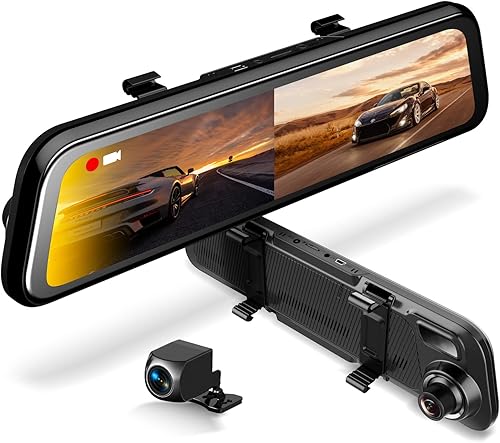
In a packed SUV, a regular rear-view mirror shows headrests, kids and luggage. A mirror dash cam replaces that view with a live feed from a rear camera, while also recording front and rear video. It is one of the most useful upgrades for families and anyone towing or hauling.
Quick answer: our top pick is the WOLFBOX G840S, because it replaces a blocked rear-view mirror with a clear live rear feed and records front and rear.
Quick picks
| Mirror cam | Screen | Best for | Price |
|---|---|---|---|
| WOLFBOX G840S | 12-inch | Best overall | Check price |
| WOLFBOX G900 | 12-inch, 4K front | Sharper front recording | Check price |
| Rexing M2 | Mirror-style | Budget alternative | Check price |
The best mirror dash cams
WOLFBOX G840S
Best for: Families who want a clear, wide rear view and front recording.
- Vehicle Service Type
- Bus, Car, Minivan, Truck
- Connectivity Technology
- USB
- Video Capture Resolution
- 2160p
- Mounting Type
- Rearview Mirror Mount
- Field Of View
- 170 degrees
- Control Method
- Touch
The G840S replaces your view with a 12-inch low-reflectivity screen and records 4K front and 1080p rear. The 170° front and 140° rear lenses cut blind spots, and the rear camera doubles as a backup camera. An external GPS antenna is included.
Pros
- 12-inch screen gives a wide rear view past passengers and cargo
- 4K front and 1080p rear recording
- Works as a backup camera
- Low-reflectivity LCD reduces glare
Cons
- Screen can still wash out in direct sun
- Clamps over your mirror, which adds bulk
WOLFBOX G900
Best for: Drivers who want higher-resolution front footage.
- Vehicle Service Type
- Bus, Car, Minivan, Truck
- Connectivity Technology
- USB, Wi-Fi
- Video Capture Resolution
- 2160p
- Mounting Type
- Rearview Mirror Mount
- Field Of View
- 170 degrees
- Control Method
- App, Touch, Voice
The G900 Tripro records three channels: 4K front on a STARVIS 2 IMX678 sensor, 2.5K rear and a 1080p bumper camera for trailers and tight spots. It has a 12-inch screen, 5.8GHz Wi-Fi and voice control.
Pros
- 4K front with STARVIS 2
- Third bumper camera for hitching and parking
- 5.8GHz Wi-Fi and voice control
- 12-inch display
Cons
- Three cameras to wire
- Larger than most factory mirrors
Rexing M2 Mirror Dash Cam
Best for: Buyers trying a mirror cam for the first time.
- Vehicle Service Type
- Car, Truck
- Connectivity Technology
- USB
- Video Capture Resolution
- 1080p
- Mounting Type
- Rearview Mirror Mount
- Field Of View
- 170 degrees
- Other Special Features of the Product
- Built-In GPS, Night Vision, Reverse Assist
The Rexing M2 records 1080p front and rear and streams the rear view to a 12-inch IPS touchscreen. It adds radar-based blind-spot detection, ADAS alerts and GPS, plus an automatic backup view.
Pros
- Lower cost
- Blind-spot detection and ADAS alerts
- 12-inch touchscreen with auto backup view
- Built-in GPS
Cons
- 1080p video front and rear
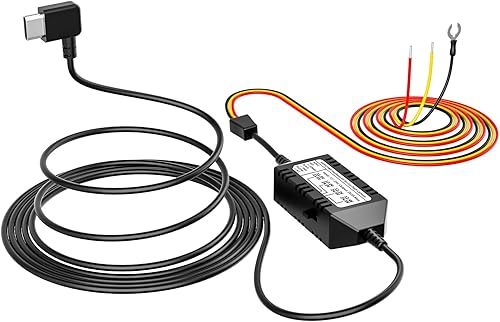
- Blind-spot radar adds wiring
Pros and cons of mirror dash cams
Pros: a wide, unobstructed rear view; easier parking with backup lines; two cameras in one install.
Cons: some drivers need time to adjust their eye focus to a screen; glare in sunlight; extra wiring for the rear camera.
Installation tips
- Strap the mirror cam over your existing mirror using the included bands.
- Mount the rear camera inside the rear window or outside above the license plate.
- For backup-line triggering, connect the reverse wire to the reverse light circuit.
- Hide cables along the headliner and pillar trim.
Do not route cables over side-curtain airbags in the A-pillars or B-pillars. Tuck wires behind the trim edge, or route them along a path the vehicle maker approves.
Mirror dash cam FAQ
How does a mirror dash cam work?
It straps over or replaces your rear-view mirror. A camera on the rear window or tailgate sends a live feed to the mirror screen, and the unit records front and rear video.
Is a mirror cam hard to get used to?
Some drivers need a few days, because your eyes have to refocus on a screen instead of a reflection. Most units let you switch back to a normal mirror view.
Where should I mount the rear camera on an SUV?
Inside the rear window is easiest. Mounting it outside near the license plate gives a clearer view, but it needs a weatherproof camera and a longer cable run.
Bottom line
The WOLFBOX G840S is the best mirror cam for most SUVs. If you want sharper front video, step up to the WOLFBOX G900.
Sources
Official sources for the standards, safety rules and products in this guide. Specifications change between model years, so confirm current specs and fitment on the manufacturer's site before you buy.
- 49 CFR 571.111 — Rear visibility (FMVSS 111) — eCFR
- WOLFBOX — official site — current product specifications
- Rexing — official site — current product specifications